Office overview
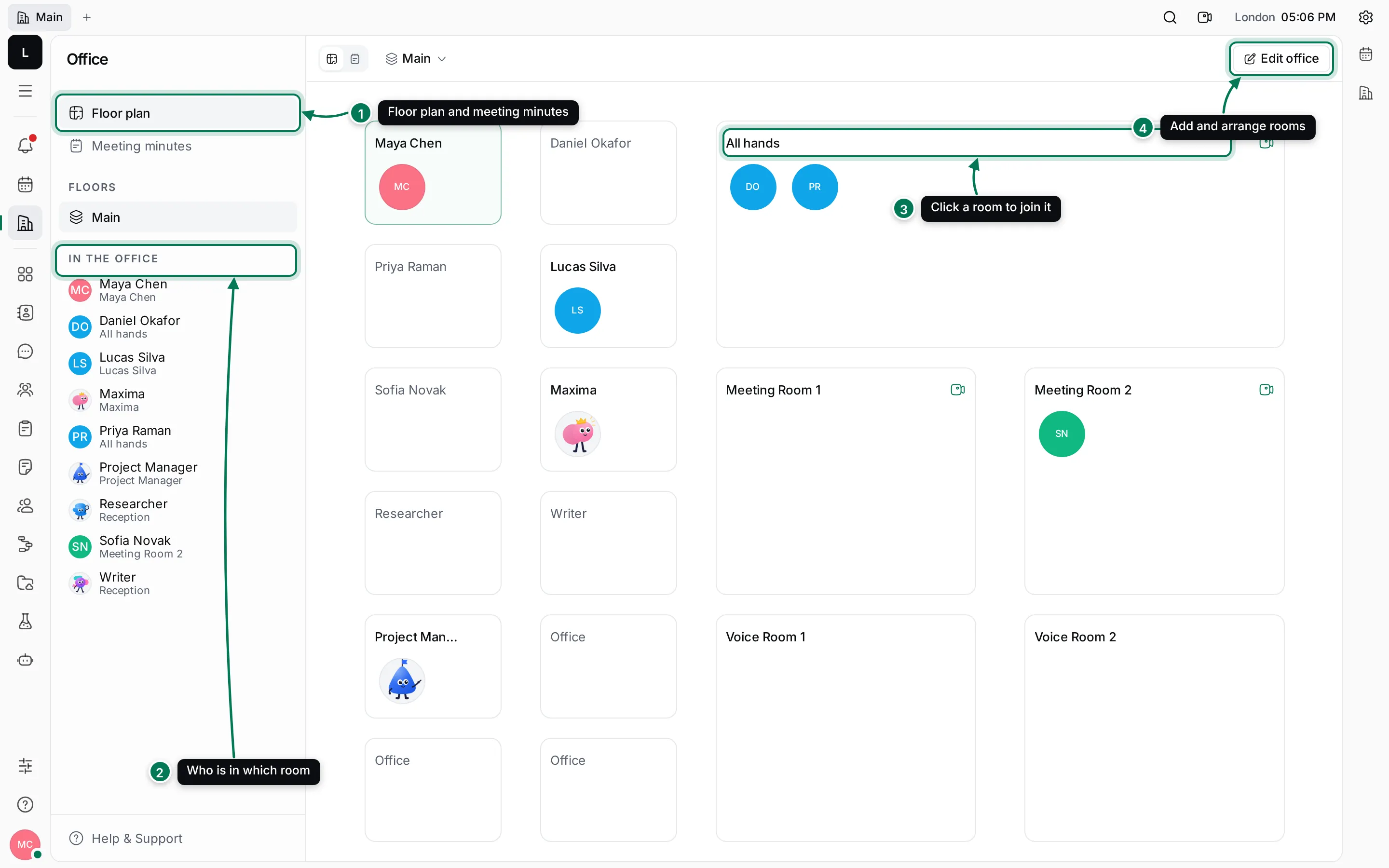
Office is a floor plan of your workspace. Everyone has their own office, and there are meeting rooms for the whole team. You can see at a glance who is in, who is in a meeting and where, and step into a room to talk. Every meeting gets meeting minutes with notes, the meeting’s chat and a transcript.
Open Office (the building icon) from the left rail.
A short tour
Section titled “A short tour”- Floor plan and Meeting minutes at the top of the navigator switch between the map and the list of past meetings. Floors lists the floors of your office.
- In the office lists everyone who is online and the room they’re in. Click a name to go to their room.
- On the plan, people sit in rooms as avatars. Click a meeting room to join it, or someone’s office to knock.
- Edit office lets you add, move and resize rooms.
Your own office is outlined in colour. An office’s name is greyed out while nobody is in it. A camera icon marks rooms with video; a lock marks rooms where you have to knock.
In this section
Section titled “In this section”Rooms, presence and knockingJoin a room, see who's around, knock on an office and invite people.
Arrange the officeAdd rooms and floors, and set who can come in and how meetings start.
CallsMicrophone, camera, screen sharing, transcription and recording.
Meeting minutesNotes, chat and transcript of every meeting.
You can also call someone straight from their card in Chat.