API tokens and the REST API
Scripts and other tools can read and change your workspace through the Maxint Work REST API. They sign in with an API token: a key for one workspace that acts as you, with your role in that workspace. A token never sees more than you do.
Create a token
Section titled “Create a token”Any member with the User role or higher can create tokens.
-
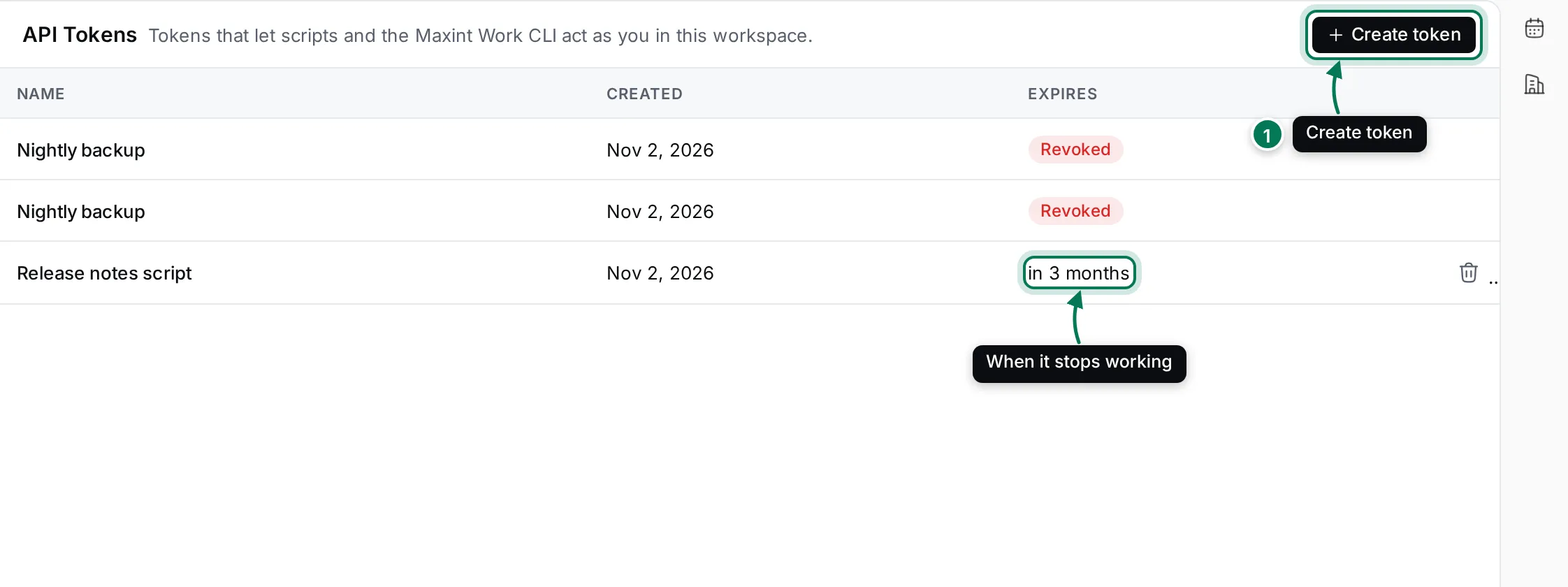
Open Settings › API Tokens and click Create token (1).
-
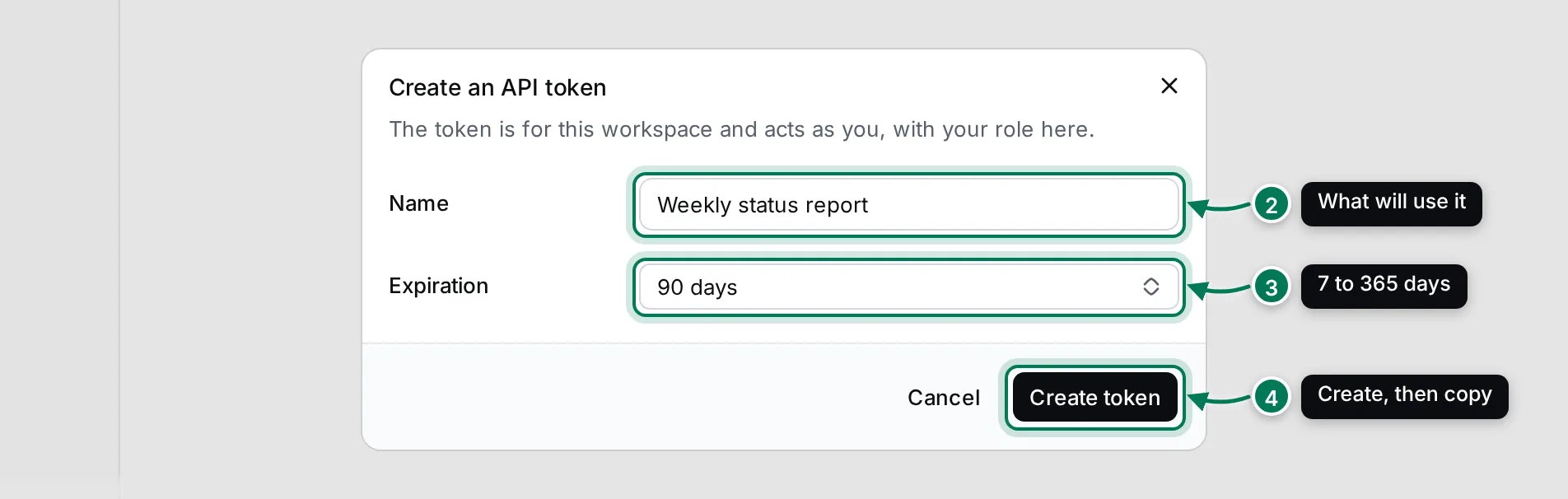
Give it a Name that says what will use it (2), and choose an Expiration of 7, 30, 90 or 365 days (3).
-
Click Create token (4), then Copy. The token is shown only once: store it in your password manager or your tool’s secret settings.
Workspace settings shows this step by step with a video.
Each token works in the workspace it was created in. The list shows when each token was created and when it expires. To stop a token, click its trash button (Revoke) and confirm. Revoked and expired tokens stay in the list, marked Revoked or Expired.
Call the API
Section titled “Call the API”The API lives at your Maxint Work address followed by /api/v1. Send the token in an Authorization header with
the Bearer scheme. Requests and responses are JSON.
export WORK_URL="https://work.example.com"          # your Maxint Work addressexport WORK_API_TOKEN="paste-your-token-here"
# the projects you can seecurl -s "$WORK_URL/api/v1/projects" \  -H "Authorization: Bearer $WORK_API_TOKEN"
Find issues
Section titled “Find issues”GET /api/v1/issues lists issues and takes filters as query parameters, such as identifier, projectId,
statusId, assigneeId, priority, labelId, milestoneId, search (words in the title and text), and due or
updated date ranges.
# one issue by its IDcurl -s "$WORK_URL/api/v1/issues?identifier=LUM-7" \  -H "Authorization: Bearer $WORK_API_TOKEN"
# in-progress issues of a project, most recently changed firstcurl -s "$WORK_URL/api/v1/issues?projectId=<project id>&statusId=tracker:status:InProgress&sort=-updatedAt" \  -H "Authorization: Bearer $WORK_API_TOKEN"
Use the id from a response (not the LUM-7 style identifier) in paths such as /api/v1/issues/{id}.
Create and change an issue
Section titled “Create and change an issue”# create an issuecurl -s -X POST "$WORK_URL/api/v1/issues" \ -H "Authorization: Bearer $WORK_API_TOKEN" \ -H "Content-Type: application/json" \ -d '{"projectId": "<project id>", "title": "Weekly status: beta crash rate", "taskTypeId": "tracker:taskTypes:Issue", "priority": "high"}'
# change its prioritycurl -s -X PATCH "$WORK_URL/api/v1/issues/<issue id>" \ -H "Authorization: Bearer $WORK_API_TOKEN" \ -H "Content-Type: application/json" \ -d '{"priority": "urgent"}'Changes made through the API show in the app at once, in the issue’s activity, under your name.
Lists and paging
Section titled “Lists and paging”Every list returns { "items": [...], "nextCursor": "..." }.
limitsets the page size: 50 by default, 200 at most.- Pass the
nextCursorvalue ascursorto get the next page. There is nonextCursoron the last page. sorttakes a field name, with-in front for descending order.total=truealso returns the number of matches intotal.
Errors
Section titled “Errors”Errors use standard HTTP status codes with a JSON body that has a title and a detail, for example:
{ "title": "Unauthorized", "status": 401, "detail": "missing bearer token" }401 means the token is missing, wrong or expired; 403 that your role doesn’t allow the action; 404 that the
object doesn’t exist or you can’t see it.
What else the API covers
Section titled “What else the API covers”Besides issues and projects, the API reaches most of the workspace: documents and teamspaces, drives and files, chat channels and messages, cards, contacts and companies, calendars and events, test cases and runs, processes, and webhooks. Ask your workspace owner or the Maxint team for the full API description.