Tracker overview
The Tracker is where your team plans and follows its work. Each piece of work is an issue: a bug, a feature or a task. Issues live in projects, and each project gives its issues a short ID such as LUM-7.
Open it from Issues in the left rail. The navigator lists your views and projects, and the main area shows the issues of whatever you pick.
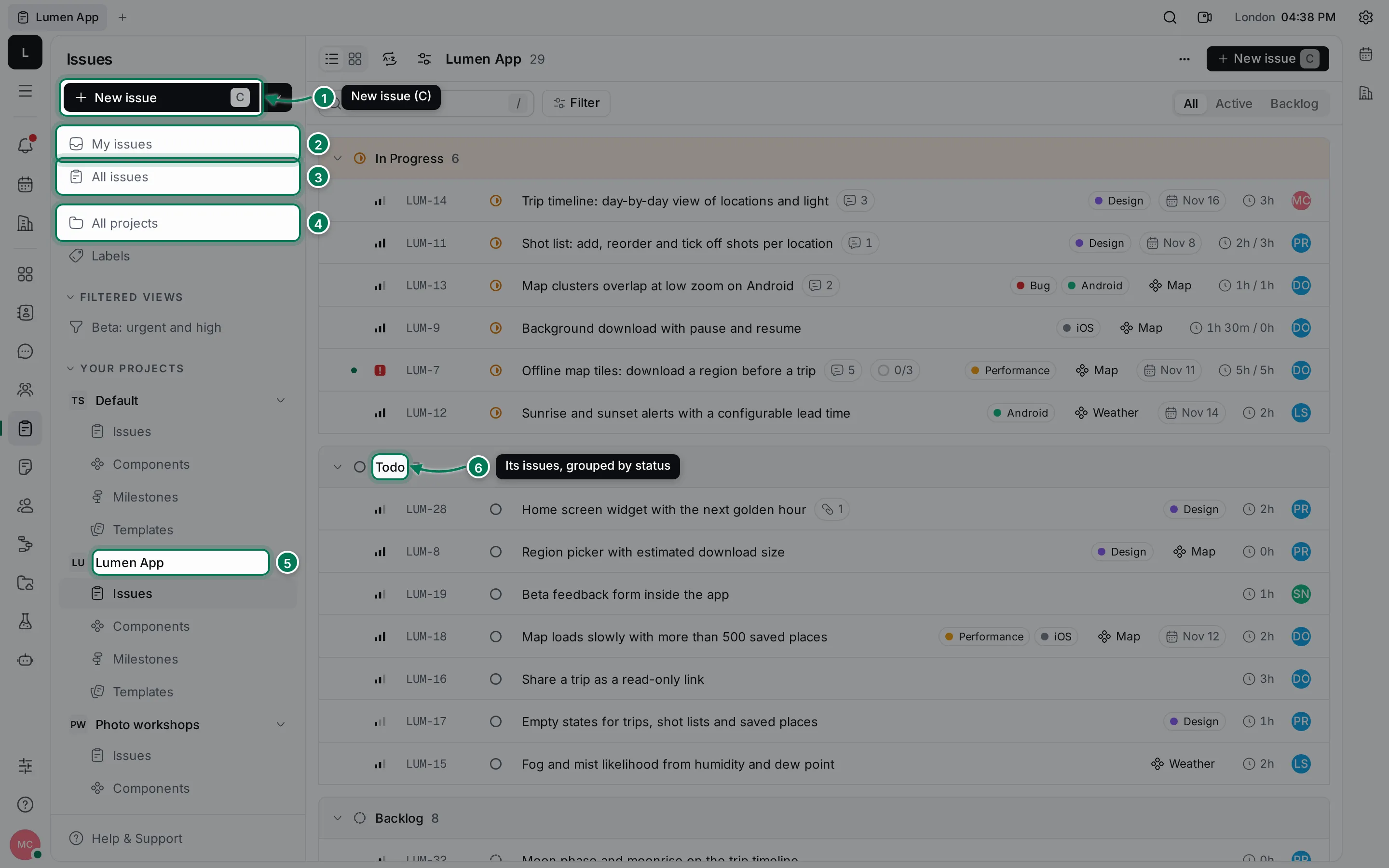
- New issue creates an issue. Press C anywhere in the Tracker to do the same.
- My issues shows the issues assigned to you, the ones you created, and the ones you follow.
- All issues shows the issues of every project you can see.
- All projects lists the projects, and Labels lists the labels shared by all projects.
- Each project under Your projects has its Issues, Components, Milestones and Templates.
- The issue list groups issues by status. You can switch to a board, regroup, filter and save the result as a view.
What you can do
Section titled “What you can do”Create and manage projectsSet up a project, its ID prefix, members and defaults.
Create issuesAdd issues, keep drafts and start from templates.
Work on an issueEdit properties, comment, attach files and report time.
Sub-issues and relationsBreak work down and link issues that depend on each other.
List and board viewsGroup, order and choose what each row and card shows.
Search, filters and saved viewsFind issues and keep the filters you use often.
Labels, components and milestonesOrganize issues by topic, area and release.
Bulk changes and shortcutsChange many issues at once and work from the keyboard.
How issues move
Section titled “How issues move”Every issue has a status: Backlog, Todo, In Progress, Done or Canceled. New issues start in the project’s default status, usually Backlog. Move an issue along by changing its status in the list, on the board or on the issue page.
The Active tab of a list shows the issues being worked on or up next. The Backlog tab shows the ones nobody has started.