Glossary
Many of these words show up on every issue. Here is one, with the parts marked:
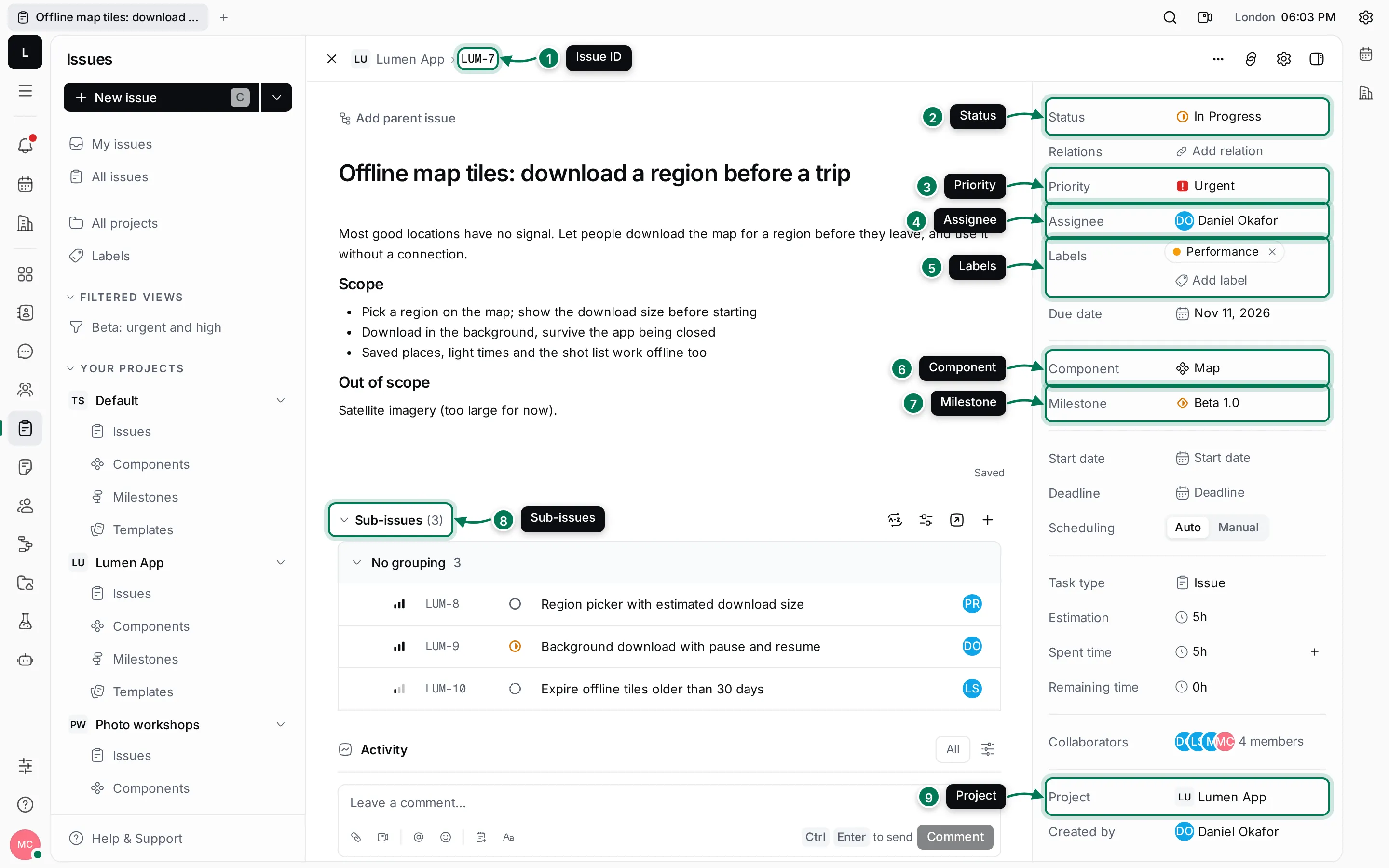
- Issue ID · 2. Status · 3. Priority · 4. Assignee · 5. Labels · 6. Component · 7. Milestone · 8. Sub-issues · 9. Project
-
Action item: A to-do in your Planner. You can give it a time slot on your calendar.
-
Activity: The history at the bottom of an issue, document or card: comments and every change, with who made it and when.
-
AI Worker: An AI teammate in your workspace. Mention it, assign it an issue or chat with it. See AI Workers.
-
Assignee: The person, or AI Worker, responsible for an issue.
-
Card: A record of a type your team defines, such as a feature or a customer, with its own fields. See Cards.
-
Channel: A conversation in Chat that many people can join, such as #general or #product.
-
Command palette: The search box that finds anything and runs commands. Open it with Ctrl+K. See Find your way around.
-
Component: A part of a product that a project’s issues belong to, such as Map or Weather, often with a lead. See Labels, components and milestones.
-
Direct message: A private conversation in Chat between you and one or more people. See Direct messages.
-
Document: A page your team writes together in Documents. Documents can contain other documents.
-
Drive: A place for files and folders in Drive, with versions and previews.
-
Inbox: Your notifications: mentions, assignments, replies and changes to things you follow. See Inbox.
-
Invite link: A link that lets people join a workspace with a set role. See Invite your team.
-
Issue: A piece of work in a project: a task, a feature or a bug. See Tracker.
-
Issue ID: An issue’s short name: the project’s identifier and a number, such as
LUM-7. -
Label: A coloured tag that groups issues across projects, such as Bug or iOS.
-
Maxima: The AI coordinator in every workspace. Give it a goal and it plans the steps and brings in specialist AI Workers. See Chat with Maxima.
-
Maxint account: The account you sign in with. One account works in every workspace you belong to. See Sign up and sign in.
-
Meeting minutes: The notes, chat and transcript kept for each meeting in Office.
-
Member: Anyone in a workspace, with a role.
-
Milestone: A target date that groups a project’s issues, such as a release. See Labels, components and milestones.
-
Navigator: The column next to the rail that shows what’s inside the open app.
-
Priority: How urgent an issue is: Urgent, High, Medium, Low or no priority.
-
Process: A step-by-step workflow that runs on cards. See Processes.
-
Project: A group of issues with its own identifier, members, statuses and settings. See Create and manage projects.
-
Rail: The narrow bar of app icons on the left of the window.
-
Role: What a member may do in the workspace: Owner, Maintainer, User, Guest or Readonly. See Roles and permissions.
-
Space: A container with its own members, such as a project, teamspace, drive or card space.
-
Status: Where an issue is in its life: Backlog, Todo, In Progress, Done or Canceled. Your own status, set from your menu, is something else: see Your profile and status.
-
Sub-issue: An issue inside another issue, for breaking work into steps. See Sub-issues and relations.
-
Tab: A place you keep open in the top bar, like a browser tab.
-
Teamspace: A space in Documents that holds a team’s documents, such as Product or Engineering. See Teamspaces.
-
Test case, test plan, test run: A check to repeat, a set of checks for a release, and one pass through them with results. See Test management.
-
Thread: Replies to one message, kept apart from the main conversation. See Threads and reactions.
-
View: A saved way of looking at a list: filters, grouping, ordering and which properties show. See Search, filters and saved views.
-
Workspace: Everything your team shares in Maxint Work, with its own members and settings. See Create a workspace.