Test management overview
Test management is where your team keeps its manual tests and their results. You write each check once as a test case with its preconditions, steps and expected result. You group cases into test suites, collect the ones you run often into test plans, and record each round of testing as a test run.
Lumen Labs keeps its app tests in the Lumen QA project: suites for Onboarding, Offline maps, Light and weather and Trips, a Smoke test and a Beta 1.0 regression plan, and a run for each beta build.
Open Test management from the left rail.
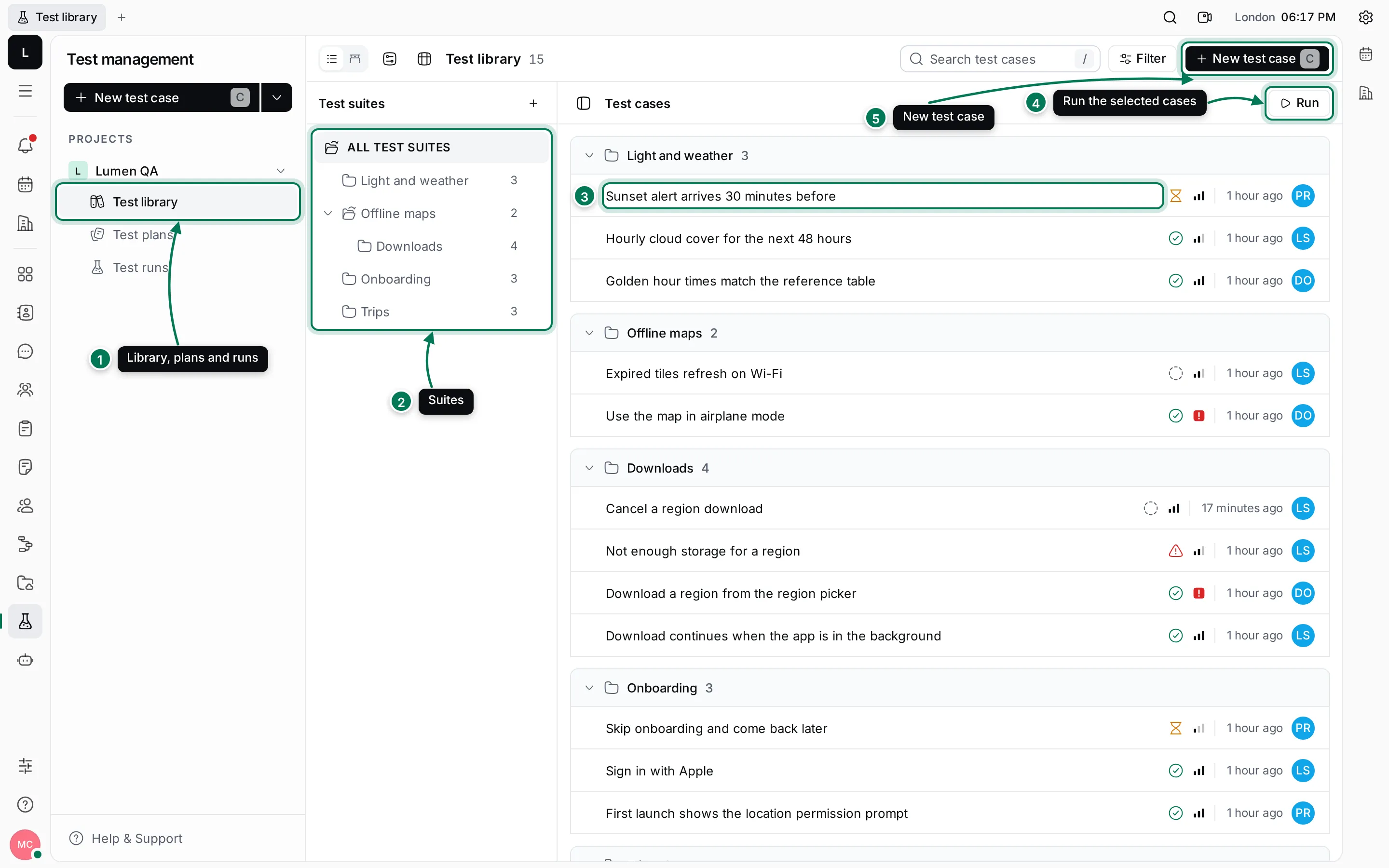
- Each project has a Test library, Test plans and Test runs.
- The Test suites pane lists the suites as a tree. Click one to see only its cases.
- The test cases, grouped by suite, with their status, priority, last change and assignee.
- Run starts a test run with the cases you selected.
- New test case adds a case. Press C to do the same. The arrow next to it creates a project or a suite.
How the parts fit together
Section titled “How the parts fit together”- A test project holds everything for one product or team, and decides who can see it.
- A test suite is a folder of test cases. Suites can be nested: Downloads sits inside Offline maps.
- A test case describes one check. Its status tracks the review of the case itself: Draft, Ready for review, Need to fix review comments, Approved or Rejected.
- A test plan is a reusable list of cases, each with the person who usually runs it.
- A test run is one round of testing, such as a build before release. It holds a result for each case: Untested, Passed, Failed or Blocked.
When a test fails, create a Tracker issue from the result so the bug is fixed and linked to the test.
What you can do
Section titled “What you can do”Projects and suitesCreate a test project and organise its cases into suites.
Write test casesAdd cases with preconditions, steps and expected results.
Test plansKeep the sets of cases you run together.
Run tests and record resultsStart a run, go through it with the run assistant and see progress.
Link tests to issuesCreate Tracker issues from failed tests and link related work.