Work // Controlled documents
Controlled documents overview
Controlled documents are documents whose wording matters and whose changes need sign-off: standard operating procedures, work instructions, policies. Each one is written from a template, goes through review and approval, and becomes effective. When it needs to change, you start a new version, and the old one is archived once the new one takes effect.
Lumen Labs keeps its release process here, in a space called Release and quality: the Release checklist (SOP-1) is effective in its second version, the App store submission procedure is waiting for Maya’s approval, and a work instruction for beta builds is waiting for her review.
Open Controlled documents from the left rail.
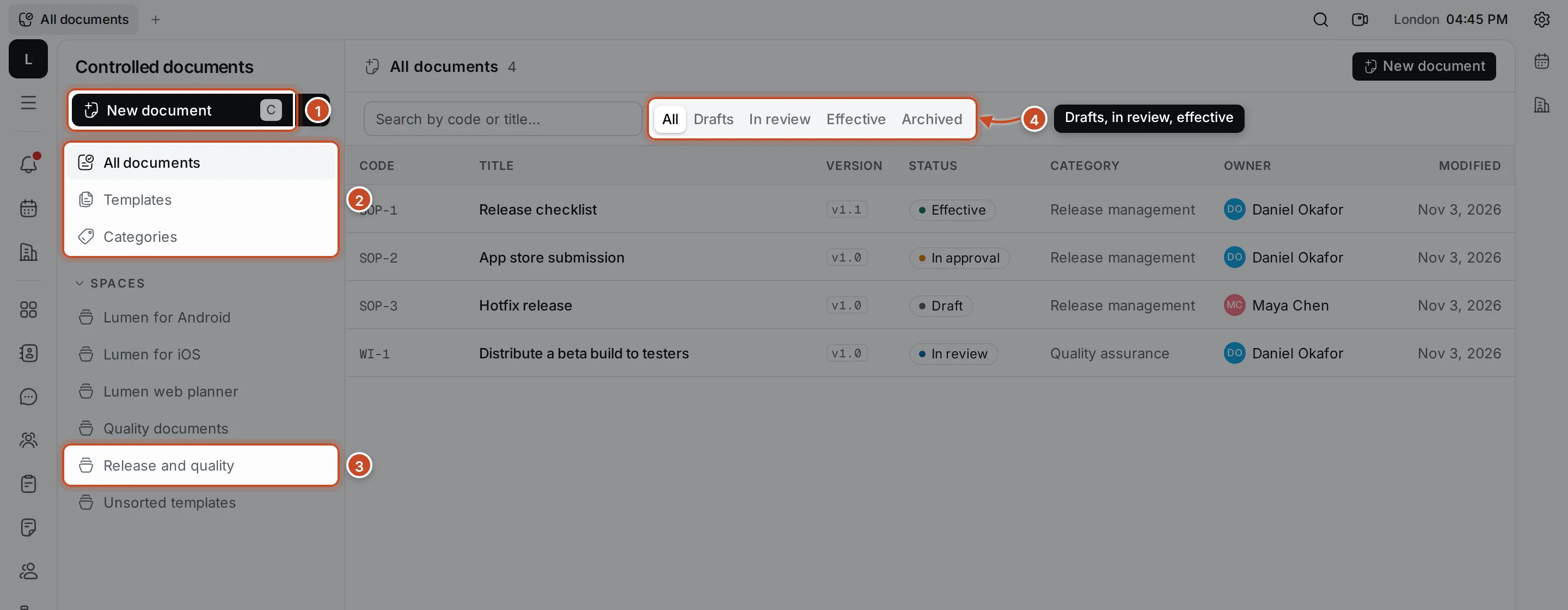
- New document creates a document from a template. Press C to do the same. The arrow next to it offers New template, New space and New category.
- All documents, Templates and Categories show those across all your spaces.
- Spaces lists the document spaces you’re a member of. Click one to see its documents as a tree.
- The tabs narrow the list to Drafts, documents In review, Effective ones or Archived ones.
How the parts fit together
Section titled “How the parts fit together”- A space holds documents, templates, folders and categories. Its roles, Manager, QARA and Qualified User, decide who may create, review and approve documents in it. Every workspace has a Quality documents space with standard categories, and each product is a space too.
- A category is a code and a title, such as REL · Release management.
- A template gives new documents their starting content, their category and their number prefix: documents from the SOP template are numbered SOP-1, SOP-2 and so on.
- A document has a code, a title, a version such as v1.0, and a status that follows its life: Draft, In review, Reviewed, In approval, Approved or Rejected, then Effective, and finally Archived or Obsolete.
What you can do
Section titled “What you can do”Spaces, categories and foldersSet up where documents live and how they're sorted.
TemplatesCreate the templates every document starts from.
Create and edit documentsCreate a document from a template and write its draft.
Review and approvalSend a draft for review and approval, and review or approve one.
Versions and archivingChange an effective document with a new version, or retire it.