Work // Inventory
Inventory overview
Inventory is a catalogue of the things your team keeps track of: stock you sell, equipment you lend, devices you test on. You sort them into categories, each item is a product, and each product can have variants, such as sizes, colours or single units, with their own SKU.
Lumen Labs uses Inventory for its device lab and loaner pool: Demo devices (phones and tablets for store demos), Loaner cameras (camera bodies and lenses that photographers borrow on trips) and Event kit (tripods and banners).
Open Inventory from the left rail.
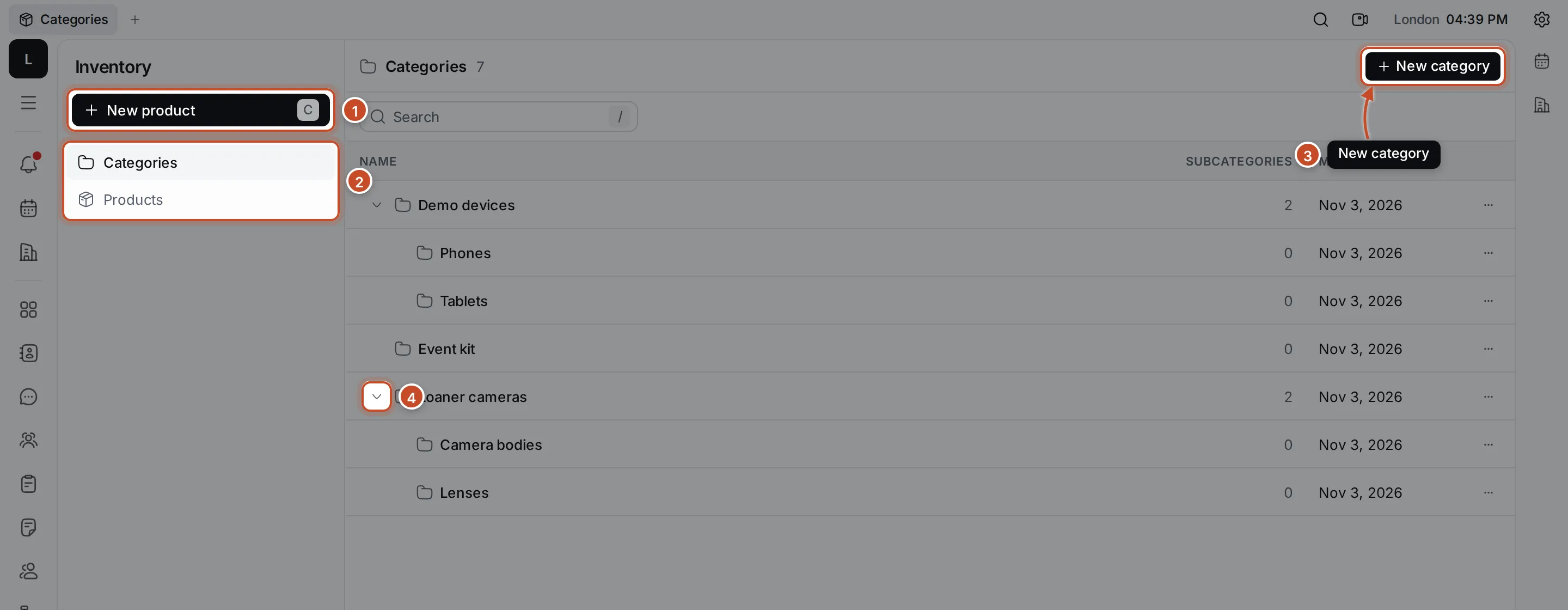
- New product adds a product. Press C anywhere in Inventory to do the same.
- Categories shows the category tree; Products shows every product in a table.
- New category adds a top-level category.
- Click the chevron next to a category to fold or unfold its subcategories.
How the parts fit together
Section titled “How the parts fit together”- A category groups products. Categories can have subcategories, as deep as you need: Loaner cameras holds Camera bodies and Lenses.
- A product is one kind of item, such as Full-frame mirrorless body. It belongs to exactly one category.
- A variant is a version of a product with a name and an optional SKU. Lumen Labs uses one variant per physical unit, with its asset tag as the SKU: Loaner 1 is LL-CAM-001.
Categories and products have files and comments, so you can keep manuals and receipts with the item and note who borrowed it.
What you can do
Section titled “What you can do”Organise categoriesCreate categories and subcategories, rename and delete them.
Add and find productsCreate products, filter and sort the product list, move products.
Variants and SKUsGive a product its variants and keep their SKUs.