Work // Trainings
Trainings overview
Trainings check that people know what they need to, such as how your team ships a release or handles customer data. A trainer writes a training with questions, releases it and sends a request to the people who should take it. Each trainee answers the questions in an attempt, and passes when enough answers are right.
Open it from Trainings in the left rail.
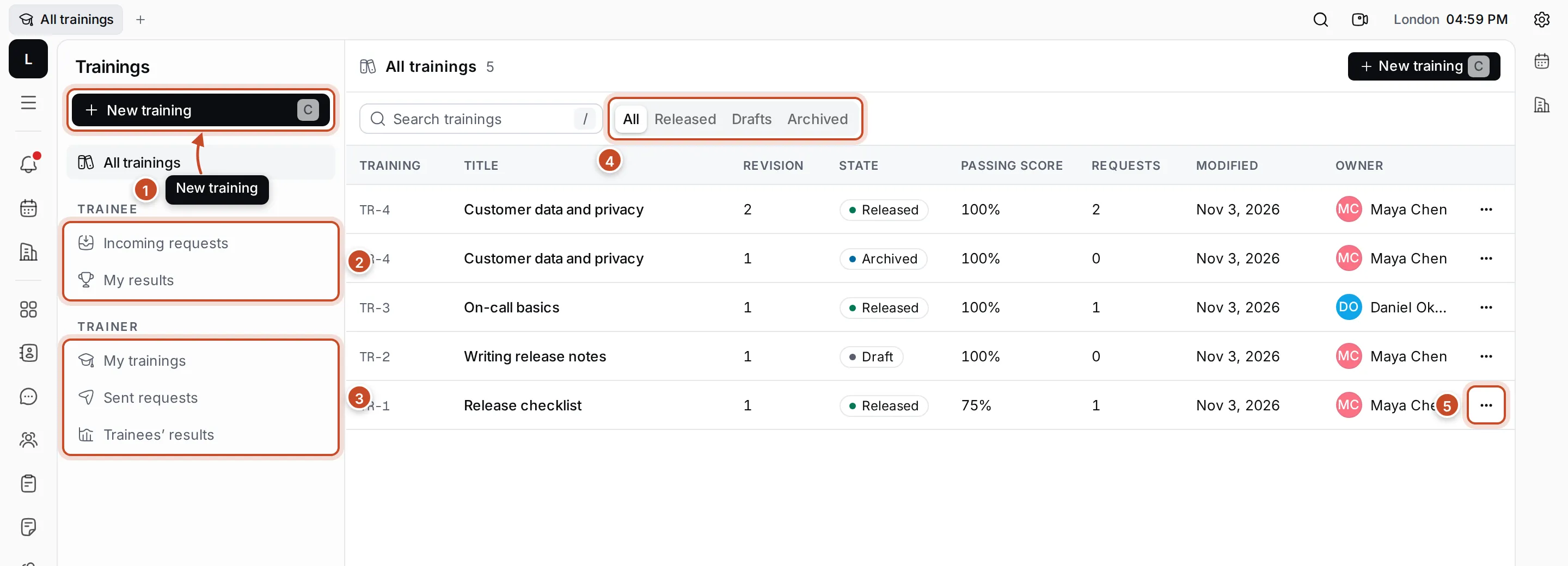
- New training: write a new one. Press C to do the same.
- Trainee: what you are asked to take. Incoming requests lists the trainings people have asked you to take, and My results your attempts and scores.
- Trainer: what you teach. My trainings lists the trainings you own, Sent requests the requests you sent, and Trainees’ results the attempts of the people you asked.
- All, Released, Drafts, Archived: show the trainings in one state.
- ⋯: the training’s actions, such as Assign training or Create new version.
All trainings lists every training with its code (such as TR-1), title, revision, state, passing score, number of requests, when it changed, and its owner. Type in Search trainings to find one by code or title.
The life of a training
Section titled “The life of a training”| State | What it means |
|---|---|
| Draft | Being written. You can change everything, and no one can take it yet. |
| Released | Fixed. You can send requests for it, and trainees can take it. |
| Archived | Replaced by a newer revision of the same training. |
A released training can’t be changed. To update it, create a new version: a draft with the same code and the next revision number. Releasing it archives the previous revision.
What you can do
Section titled “What you can do”Create a trainingWrite the questions and right answers, release it, make new versions.
Assign a training and follow resultsAsk people to take a training and see who passed.
Take a trainingAnswer the questions, submit and see your score.